
Taking Type to the Next Level with Alternate Characters 57
By jeya. Posted: February 24, 2010 at 1:02 am in Articles, Tutorials
How do you tell what fonts have alternates? Well most likely the fonts you are downloading from free font sites like DAFont.com will not have alternates. You have to pay money for a good font, where the designer of the font put in extra characters into the font family. At the end of this article, I have listed some of the most amazing fonts that have alternates.
Types of Alternates
Ligatures - This is where two or more characters are linked together. If you look at the example below the T and H characters are linked together. The font used in this example is Aphrodite Slim Pro.

Logotypes - This is where a word is stylized as a logo to be included in your type. You will usually find these in the Show Entire Glyphs and not as an alternate.

Biform characters - These alternate characters can make capital letters have a lowercase look or lowercase letters with capital letter look while keeping the same size and weight. The font used in this example is Press Gothic Pro.

Swash characters - This is where a certain letter can have a fancy look to them. You will see swash characters in lot's of calligraphic fonts. They are very useful at the beggining and end of a word. The font used in this example is Burgues Script.

How To Access Alternates
To gain a better understanding of how you can benefit from using alternate characters, we should first look at how you can access them. Both Adobe Illustrator and InDesign have a great way to access these alternate characters. Unfortunately, Adobe Photoshop does not have a way to access them via a Glyphs panel. In this tutorial we are going to use Illustrator.
Step 1
The font I am going to be using is Aphrodite Slim Pro. It is an amazing handmade font full of alternate and ligature forms designed by Sabrina Lopez and Maximiliano Sproviero. You have to purchase it, but it is well worth your money. You can buy it from myfonts.com here. Make sure you buy the Pro version as it includes all the different alternate characters.
Step 2
Using the Type Tool, type out Media on one layer and change the font to Aphrodite Slim Pro. I set the font size to 72 pt.

Step 3
Using the Type Tool create another type layer and type in Militia. Place it where you feel fit.

Step 4
Open up the Glyphs panel by going to Window > Type > Glyphs
This Glyphs panel gives you the ability to see all of the characters as well as the alternate characters for any given font. This panel is the heart to this tutorial. It opens by default showing all the characters available for the font.

Step 5
It is great to see all the different characters available to us, but the real power of the Glyphs panel is being able to show the Alternates for a selected character.
With the Type Tool, select the first "e" in Media. In the drop down box for Show change it to Alternates for Current Selection. This will show all the alternates for the letter e. Find one you like by clicking on each of the different thumbnails.

Step 6
Continue going through and selecting different characters and seeing which ones look the best. Don't over do it though!

Step 7
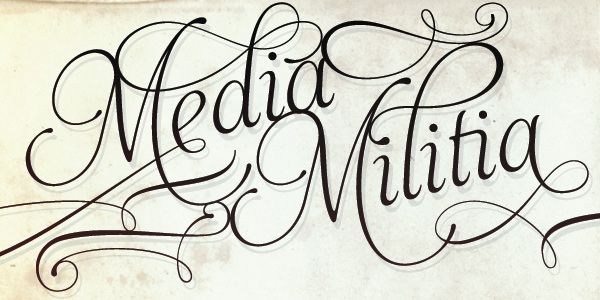
You may have noticed while selecting some of the characters that there are ornaments included with the type. I created two new type layers and found two ornaments that fit in perfectly with the type. The letters I used were X and Y. Using the selection tool I put them up against the other letters.

Tip:
While Photoshop does not have a Glyphs panel, you can create your typography inside of Illustrator and copy and paste it into Photoshop to manipulate.

Great Fonts With Alternates
Aphrodite Slim Pro
This font as seen in the tutorial above has more than 1000 glyphs. It a beautiful calligraphy based font.
Ministry Script
Ministry Script was designed to be “A time capsule that marks both the American ad art of the 1920s, and the current new-millennium acrobatics of digital type.
Over 1000 characters
Affair
Affair is an extraordinary new calligraphic typeface by Alejandro Paul with a party full of swash characters, ligatures, and ornaments.

Mussica
Mussica is a crisp font created by Corradine Fonts. It feature a few extra glyphs for your characters that add a wow effect.
Blanchard
Blanchard is a revival and elaborate extension of Muriel, a 1950 metal face made by Blanchard Trochut for the Fonderie Typographique Française, that was published simultaneously by the Spanish Gans foundry under the name Juventud. Blanchard is a script that embodies the post-war narrow decorative aesthetic that would become the instantly recognizable feature of that era’s design.
Metroscript
Metroscript is a handwritten script with styles from the 1920s and the 1950s. With a huge vintage sports theme, it has many ligatures, swashes, alternates, foreign accented characters and tails—all of which connect seamlessly.
Liza
Liza Pro, Underware’s latest creation, is a live-script typeface. Thanks to its extremely intelligent OpenType architecture, she approaches human hand lettering as close as technically possible. Liza Pro deeply analyzes the text. Out of a stock of 4000 hand crafted characters, Liza creates the most optimal combination. All of this works automatically. All you need to do is typing your lettres d’amour, and Liza makes the text always look different.
Nelly Script Flourish
Nelly Script Flourish is the jewelry to a beautifully appointed lady, the icing to the wedding cake, the VaVoom! Nelly Script Flourish comes complete with a large variety of alternate upper and lowercase forms in OpenType format.
Mon Amour Script Pro
Mainly for invitations; Mon Amour Script Pro, is an Open-Type font, which will delight you. It has the alternate, swash and ligature functions.
Quijote Sauvage Pro
Quijote Sauvage Pro is a very expressive calligraphic font. It includes all the ligatures, alternates and swashes..
Buffet Script
Buffet Script is based on fantastic calligraphy by Alf Becker, arguably the greatest American sign lettering artist of all time
Paradise Script
Paradise is a script font thought to be used in a wide range of pieces of design. From packaging to invitations, Paradise really looks elegant and sometimes playful at the same time. The possibilities of alternates, ligatures and combinations of them are huge. Calligraphy lovers know that words sometimes start or end with extra flourishes: This is the reason of Paradise Starters and Paradise Finishers, which will always give a sensual touch to the written word.
PF Champion Script Pro
PF Champion Script Pro is the most advanced and powerful script ever made. Four sets of alternate swashed capitals as well as a plethora of ornaments and frames (117) was included.


.


Write “Media Militia” in the text object
Now rotate your text object: 90* on the X axis and -90* on the Y axis
Create an Extrude NURBS object
And drop your text in it
Change the object properties of the Extrude NURBS to 0 / 0 / 35
Now take your ExtrudeNURBS object and hit “C” (this makes your object editable)
Open this object and select everything (Ctrl+A) then right click your object and press “Connect”
You can now delete your old object that you just “Connected”
Rename your object “Media Militia”
Take the polygon tool and the Rectangle Selection tool, make sure to un check the “only select visible elements” box
Now with the scroll button of your mouse click on your “canvas” and you will see that four different views just opened up, we will be using the top view
So middle click on the top view to make that view bigger, and select the first “M” letter of Media Militia right click on it and press “Split”
This creates a new object with just the “M” now delete the selection you have selected, this will delete the “M” from Media which leaves you with an “M” object and a “edia Milita” object. Rename the object you just split to “M”
Now go back to your “Media Militia” object and select and split the “t”, just as we did with the “M”. Delete the “t” from your Media Militia object and rename the “t” you just split to “t”
Middle click on your screen and go back to perspective view. Take the Live Selection tool and on your “M” object select the shown polygon:
Right click on your screen and select “Extrude”
Add 350 to the offset
Go into Top View and select your “t” object, press Ctrl+A (to select all the polygons) then take your Scale Tool and scale up the X axis (or the red axis) to 220
Go back to Perspective View and select the shown polygon with the Live Selection tool
Right click on your screen and select Extrude and add 1000 m in the Offset
Take your Use Model tool and the Live Selection tool
Make a floor
Go into Right View, select your three text objects and move them right on top of your floor
Now make two copies of each text object, and place each copy underneath it's original, name each object as shown below
Create a Shatter Object and copy it, name one shatter object “Shatter 1” and the other one “Shatter 2”
Change the strength of the “Shatter 1” object to 20 %, and the strength of the “Shatter 2” object to 10%
Select both Shatter objects and copy them twice, now place a Shatter object in each copied text object (match them up according to their number as shown)
Now select all of your text objects ending with either a 1 or a 2 and take the Live Selection tool
And move the “green axis” up 14.3 points, so that it is on top of the original text object
Go into top view, take your Polygon tool and select all your text objects ending with “1”
Make sure you have no polygons selected (left click anywhere on your canvas to de-select any polygons you might have selected)
Right click on your canvas and select “Knife” (make sure the visible only is checked)
Now start randomly cutting from one side of your text to another, do this around 30-60 times (this will make the shattered pieces smaller)
Make sure you don't leave any long polygons like the extruded M and T uncut
Keep cutting until you have something like this
Now do the same for the text objects ending with “2”
After that go into side view and start cutting up the text objects ending with 1 and 2 just as we did earlier (make sure to un check the “Visible Only” box)
Now select all your “2” text objects and scale up the green axis using the scale tool
Then move it down, so that the top of the letters are slightly on top of your original text
Now take all the “1” text objects and scale them up as well
Then as we did before move them down, so that the top is a little higher then the original text
Make a basic light
Make three copies of it, and name them 1, 2, 3, 4 accordingly
Change the Intensity of the first three light objects to 45% and change the intensity of the 4th light to 70%
Now select the 2nd 3rd and 4th light objects and change the shadow to “Shadow Maps (Soft)”
Now go into top view and move each light as shown below
Go into side view, select all your lights and move them up a bit as shown
Now we are going to make the materials for our floor and for our text
Start by making a new material
Double click on the material (to open the material editor) and change the color to the following
Now check the boxes for Luminance, Bump, Specular, and Displacement
Change the settings to the settings shown in the screen shots below (In the bump and displacement options you will have to load in the metal texture image)
Now close the material editor, and drop the material onto the floor
This next part isn't necessary but it gives your text a nice touch, it does take longer to render though.
We are going to load our downloaded material and place it on all of our text objects
Go into the render settings, and change the Output to the following
Then we are going to put on Global Illumination and Ambient Occlusion (just click the check box on the top, leave all the other settings on default)
Before we render our scene we are going to set our perspective view on a nice angle, I put my picture on this angle
Now hit the render button
This can take quite a while, depending on how strong your computer is, but after that we are done with Cinema 4d and we will go play in photoshop :)
Once it is finished rendering save it as a jpg format, and 300 dpi (dots per inch)
Now import your metal texture and resize it so that I covers the entire media militia text, desaturate the texture and change the blending mode to overlay.
Take your eraser tool and delete any harsh exteriors
Take your base layer and go to Image>Adjustment>Curves and change the settings to something like the following
Now import your ink texture, rasterize it, and name it Ink. Make sure you place it underneath the metal texture
Change the blending mode to multiply
Add a mask to the layer and get rid of all the dark areas surrounding the actual ink
Now duplicate this layer and hide the original, rotate and move your copy so that it is on top of the text, then with a very soft brush mask out the parts that stick out from the text.
Then after that change the transparency to 5%-50% (change it around so that you get a random look) and with a small brush start brushing the edges of the ink that is on top of your text
Duplicate your original ink texture and cover another part of the text and repeat the same process as with the other ink texture. Do this until all your text is covered with ink textures.
Now select all your ink layers and add them to a group, name the group Ink.
Change the opacity of your ink group to 40%
Now make a new layer, name it Shadow, and with a black color and a soft, big brush add a line around the text as shown:
Add a Gaussian Blur, 17 px, and bring down the opacity to 30 percent. Now delete any parts of the shadow that you don't like with a big soft brush
And we are pretty much finished
If you want to go even further you can take the dodge and burn tools and make some highlights on your Base layer
I hope this tutorial was of some help :) Cheers!

Now click on the Gradient Tool and make sure the gradient is a black to white gradient.


\

.